Empowering Your Practice: February 11, 2026 Weekly Updates
Last updated: February 11, 2026
Welcome to your weekly source for essential team updates. Each week, we will share updates designed to help you run a thriving, compliant, and efficient practice. From platform enhancements to compliance changes, this is your go-to resource for staying aligned.
Product/Engineering
Onboarding Dashboard Updates: The Onboarding Dashboard now offers clearer, real-time visibility into each employee’s onboarding and credentialing progress, making it easier to track what’s complete and what’s still required before scheduling.
What’s new
Real-time progress bars for Onboarding and Credentialing sections
Expandable sections to view specific outstanding tasks
Clear status labels for each requirement: Missing, Needs Verification, Verified, and Denied
Additional details can be found in our support article: Onboarding Dashboard
At-Risk Appointment Warnings: At-Risk Appointment Warnings are designed to prevent claim denials and unbillable work by flagging enrollment or insurance eligibility issues before services are delivered. Starting February 9, you’ll see “At Risk” warnings on the Calendar page for appointments scheduled on or after March 1 if there is an enrollment or eligibility concern. Beginning March 1, Mission Control will block the creation or completion of appointments marked “At Risk” until the issue is resolved.
These guardrails check two things:
• Enrollment – Ensures the provider (and supervising BCBA) is properly credentialed with the client’s payer.
• Eligibility – Ensures the client’s insurance is active, in-network, and includes ABA benefits.You can learn more in our support article: At-Risk Appointment Warnings
External Coverage Update: We're excited to share that providers can now add external payers like scholarships, grants, or private pay directly within a client’s existing insurance profile in Mission Control. This means no need to create a separate profile, making things simpler for everyone.
Once RCM has added the external payer in MC, simply go to the client’s Insurance Details section, scroll past the Primary Insurance details, and select Private Pay or Scholarship. Then choose the payer from the dropdown list.
After that, the external payer will be available whenever you’re scheduling appointments—making billing smoother and more flexible for families.
Check out the full article for additional details: Adding External Payers in Mission Control
Clinical Quality & Compliance
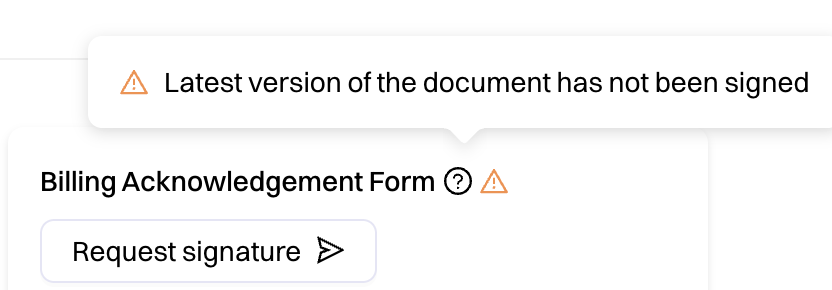
Updated Client Billing Acknowledgement Form: Please ensure all families have signed the latest version. You can verify this in the client’s profile—an orange triangle will indicate if the form is still missing.
Credentialing and Billing
Insurance Update Reminder: All clients’ insurance information must be updated in Mission Control (MC) and not in Silna. Once the insurance is added in MC, it will automatically sync to Silna to run eligibility and benefits checks. Adding new insurance directly in Silna can cause disruptions and delays in the eligibility review process.
Please check our support article for additional details on this process: Manually Adding/Updating Insurance in Mission Control (MC)
HR
Speak-Up Helpline: We’re introducing the Speak-Up Helpline as an additional, confidential way for employees and providers to raise concerns, ask questions, or request support.
What it’s for
Employee relations or workplace concerns
HR, onboarding, payroll, or employment lifecycle questions
Clinical compliance or quality concerns
HIPAA or privacy-related issues
Reporting discrepancies or concerns that don’t feel right
If you’re unsure whether your concern fits, you’re encouraged to call—the team will help route it appropriately.
How it works
Call the helpline and follow the brief automated prompts
Leave a voicemail with basic details (name optional, clinic/role, concern, preferred follow-up method)
A member of the team will review and follow up
The Speak-Up Helpline is part of our ongoing commitment to a safe, compliant, and supportive workplace. If something doesn’t feel right, this is a place to start the conversation.
Please do not hesitate to reach out to @Support or your PSM with any questions!